In Thinking, Fast and Slow, Daniel Kahneman explains two modes of human thought: fast, automatic intuition and slower, deliberate reasoning. They work together. This distinction also offers a useful way to think about AI in software.
01System 1Fast & intuitive
React to a familiar situation.
On a familiar bike ride, you notice an obstacle and adjust almost immediately. Experience helps you respond without planning every movement.
IN SOFTWARE
Route this support ticket. Rank these passages. Choose the next valid browser action.
context → focused decision
Fast does not mean always correct. Intuition can be biased or miss important context.
02System 2Slow & deliberate
Work through an unfamiliar problem.
Planning the next five years of your career takes effort: assess your skills, compare opportunities, consider trade-offs, then build a plan.
IN SOFTWARE
Investigate a bug. Compare architectures. Plan a research task and explain the reasoning.
problem → analysis → plan
Deliberation takes more time and attention. It is valuable when the problem needs it.
LLM: understand & plan→Jev: make focused judgments→Code: validate & act
TypeSafe says Kahneman’s book inspired the name “System One Models.” The AI comparison is an analogy, not a claim that models think like brains. LLMs can also answer quickly; reasoning models are particularly useful for deliberate, multi-step work. Jev returns typed judgments that still need evaluation and checks.
Real projects, the people behind them, and the code to explore. Search the directory, compare projects, or open a project for its README and developer profile.
148 projects from the community catalogue. Connecting to GitHub…
PUBLIC GITHUB API
Live GitHub results merge with the 19 Sep 2026 community catalogue. Every card labels when its numbers were checked. Illustrations are labeled separately from real demo previews.
Coverage, updates & image credits
This directory starts with 148 projects from Awesome Jev Use Cases. The public GitHub API searches for Jev in repository names and descriptions, 100 results at a time. Use “Fetch more from GitHub” to continue. GitHub limits each query to 1,000 results and may return incomplete matches; this is not a claim to list every project on the internet. Newly discovered matches are not independently audited.
Search responses are cached for 10 minutes; project and profile details for 30 minutes. No token is required for public data. API limits or errors leave the dated catalogue available. GitHub search documentation ↗
Real demo preview frames are from Awesome Jev Use Cases, with the original creator named. Other covers are original workflow illustrations, not screenshots of those products. GitHub supplies developer avatars. Source repository license ↗
01 / THE USE-CASE LIBRARY
What will you build?
Small, useful patterns. Real starting points. Open a card to see how it works.
12 use cases
↗01
Agents
Route to the right model
Send a request to the handler or model that fits the job.
Choice
◇02
Trust & safety
Check an LLM’s work
Screen messages and tool calls before your application acts.
Noul + Score
✳03
Everyday tools
Turn reviews into ratings
Find which features a review mentions, then score each one.
Noul + Score
≋04
Search & data
Retrieve better context
Rank candidate passages before they reach the answering LLM.
Score
⌁05
Trust & safety
Verify a citation
Check whether the cited passage actually supports a claim.
Choice
⌘06
Agents
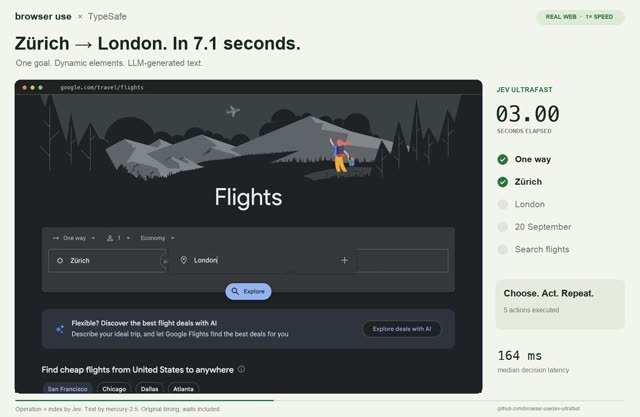
Give a browser fast decisions
Choose an action from the controls a browser can currently see.
Choice
{ }07
Search & data
Extract without inventing
Choose the right value from candidates already found in a document.
Choice
▤08
Search & data
Screen a reading list
Check abstracts against your research inclusion criteria.
Noul
⊞09
Agents
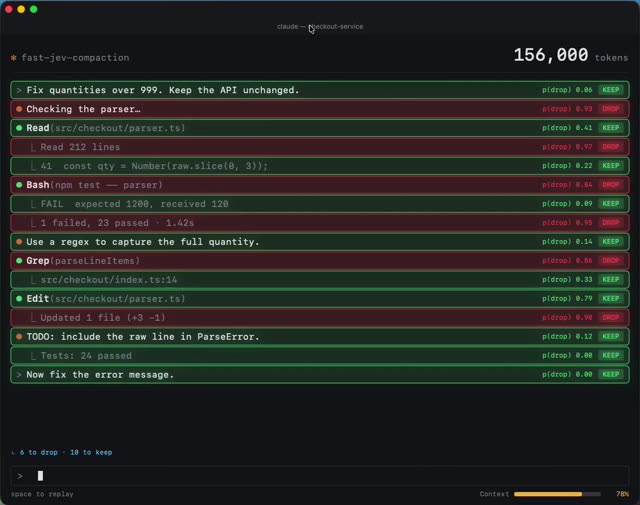
Keep useful agent context
Select relevant history when an agent’s context starts to grow.
Score
∿10
Search & data
Make text usable for ML
Turn language into signals for a downstream predictive model.
Score + Noul
▱11
Everyday tools
Triage a support inbox
Organize requests by team and urgency before a human opens them.
Choice + Score
⤴12
Agents
Find an agent’s next skill
Select a relevant capability from a known skill catalogue.
Choice
No matching use cases.
Try “routing”, “Score”, or choose a different category.
12 CURATED STARTING POINTS
Patterns, community code and ideas are labeled inside each card.
02 / THE READING DESK
Go straight to the source.
The docs, code and research worth keeping. A little context before you click.
START WITH THE BIG PICTURE
Understand the model. Then question the claims.
Official documentation explains the interface. Community research tests the edges. Read both.
Source note: These are the original slides, not updated claims from this guide. In particular, the deck’s statement about the absence of independent benchmarks is no longer current; see JevBench ↗. Architecture hypotheses and reported performance should be read with their original context. Credit remains with the presentation’s author(s).
const response = await fetch( "https://api.typesafe.ai/v1/systemone", { method: "POST", headers: { Authorization: `Bearer ${process.env.TYPESAFE_API_KEY}`, "Content-Type": "application/json" }, body: JSON.stringify({ model: "jev-1.13.0", state: "I was charged twice. Please refund me.", questions: { decision: { "type": "score", "instructions": "How time-sensitive is this request?", "criteria": [ "No time constraint stated", "A deadline is mentioned", "An active service outage is blocking work" ] } } }) });if (!response.ok) throw new Error(`HTTP ${response.status}`);const { answers } = await response.json();console.log(answers.decision);
04 / THE COMMUNITY SIGNAL
Around the Jev ecosystem.
Checking public sources…
What does this feed include?
Public GitHub projects, Hacker News stories and Bluesky posts are checked every five minutes while this page is visible. X is included when the server has an authorized API token. Unavailable sources are labeled; previously fetched results may be shown as stale for up to 24 hours.
Activity uses engagement and recency. It is a discovery signal, not a global trending chart. GitHub’s timestamps are repository push dates; stars are lifetime totals.
Keyword and source matching.
THE COMMUNITY ARCHIVE
Early experiments worth exploring.
From Awesome Jev · metrics captured 19 Sep 2026 A dated snapshot, separate from the fresh feed.